
The whole world is getting dependant on computers. Now they are no more luxury items any more. From school going child to old one all are facing radiations generated from computer monitors.
The radiations generated are although not harmful to body they are definitely harmful to our eyes. Many of us getting burning sensation and tired eyes at end of the day when we work in front of computers.
The main reason to this is the drying of eyes coursed by
1. Radiations emitted by the monitor
2 decreased in the blink rate.
3. Fatigue of the cilliary muscle which remain contracted for long period of time as we continuously stere at the screen.
The entity called computer vision syndrome.(cvs)
As a golden rule prevention is better than cure. Asthenopic symptoms in the eye are responsible for much of the morbidity in CVS. Proper rest to the eye and its muscles is recommended to relieve the associated eye strain. Various catch-phrases have been used to spread awareness about giving rest to the eyes while working on computers. A routinely recommended approach is to consciously blink the eyes every now and then (this helps replenish the tear film) and to look out the window to a distant object or to the sky—doing so provides rest to the ciliary muscles.
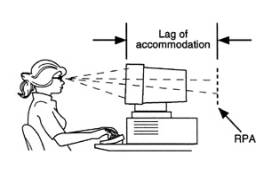
You can protect eyes for all these ill effect by simple following measures
1. Keep monitor at list 2 feet away from your eyes.
2. Blink your eyes more frequently and also roll eye balls in circular fashion with closed lids every now and then.
3. Remove your eyes away from computer to relax eye muscle by looking through window or opposite corner of the room
4. Drink lot of water. An adult should drink at list 3 liters of waters in dry and hot conditions
5. Don’t expose eyes to wind of fan or air conditioner directly or on bike cover eyes with protective glasses.]
6. Dry eye "20-20-20 rule"every 20 minutes, focus the eyes on an object 20 feet (6 meters) away for 20 seconds.Givesa convenient distance and time frame for a person to follow the advice from the optometrist and ophthalmologist. Otherwise, the patient is advised to close his/her eyes (which has a similar effect) for 20 seconds, at least every half hour. is a major symptom that is targeted in the therapy of CVS. The use of over-the-counter artificial-tear solutions can reduce the effects of dry eye in CVS.
.
7.Adjust monitor brightness and contrast settings: Go to your monitor settings and decrease the brightness and contrast until you find the balance that’s easiest on your eyes. You’d be surprised how bright and contrasted the default settings are. Make sure that your desktop and color scheme aren’t agitating your eyes either. Opt for neutral and darker-colored tones with minimal contrast until you find the right color balance. Additionally, pay attention to the brightness and contrast levels of different web pages and documents. If you’re having trouble reading a page of gray text on a black background, print it out instead or at least copy and paste into a new document with dark text on a white background. 8.Adjust other lights in the room: Even if your monitor and desktop settings are set for optimal use, light from your surroundings can irritate your eyes. If the room is too dark, that can affect the overall brightness of the monitor. If the room is too bright, it can create a glare on your monitor. Avoid glare that goes directly into your eyes — this occurs when you’re facing an uncovered window. Avoid glare come from a light source directly behind you. Consider using an anti-glare screen if necessary. And position desk lights at an angle from behind, as lights that shine directly onto your reading surface (e.g. desk) are more harsh than light bouncing off the surface at a slight angle.
9.Enlarge text: Your eyes have to strain to read small text, so keep text large to give your eyes a break. When working in text editors or viewing online materials, use the keyboard shortcut to magnify text (ctrl + “+”) as needed. For those webpage text areas that tend to be too cramped — pull them over to your favorite text editor to have more space. Always magnify to a size that feels comfortable. If you have to move your head closer to the screen, squint, or don’t feel relaxed while reading — the text is still too small. And while you’re at it, make sure your screen resolution is set high.
10.Relax: Work is important, but you need to be relaxed enough so that tension and stress don’t get in the way. Take frequent short breaks during the day, and longer breaks one to two times a day so that you can get your mind off work. Walks are good because give you exercise, fresh air, and help you look off into farther distances. At your desk you can do neck rolls, shoulder shrugs and arm swings to stretch out your neck and shoulders. Rub your temples to release any head tension. Give your eyes periods of darkness for rest, by closing your eyes or cupping your palms over your eyes (preferably in a quiet environment).
11.Wear sunglasses: When you’re not in front of your computer, you can still protect your eyes from incoming light. This will help them endure longer periods in front of the monitor. Wear sunglasses outdoors (or even indoors if necessary). Make sure that the lenses have UV protection. If they don’t — they’ll have the opposite effect and tire out your eyes. (This is because the darker environment created by the tinted lenses will cause your irises to dilate and receive more light — UV light which causes discomfort, harm and fatigue.) Polarized lenses (that also have UV protection) are ideal because they minimize glare.
12.Computer holiday As far as possible avoid using computers on your work holidays
13.You can use lubricating eye drops available after ophthalmologist's consultation
sourse :-http://www.howtogeek.com/54872/how-to-avoid-computer-eye-strain-and-keep-your-eyes-healthy/

I appreciate all of the information that you have shared. Thank you for the hard work!
ReplyDelete- eye doctors cambridge, ma